NAME
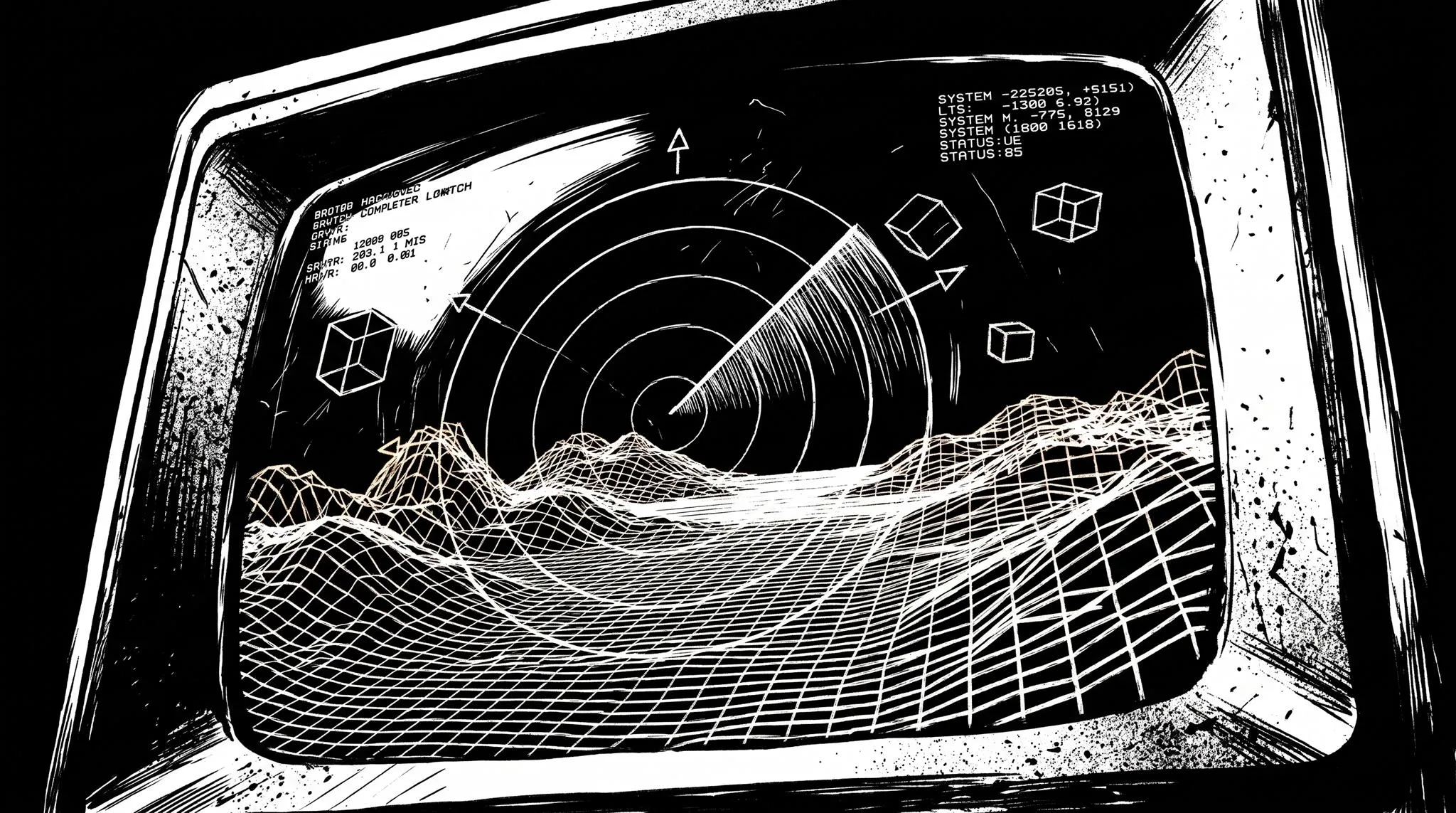
idle-vector-scrnsvr — Generative vector-console screensaver: wireframe terrain, radar rings, CRT glow. Never loops, no internet needed.
SYNOPSIS
- version
- 0.2.2 ·
- status
- stable
- platform
- Windows, Linux
- license
- other
- source
- github.com/kappa-yashi/idle-vector_scrnsvr
DESCRIPTION
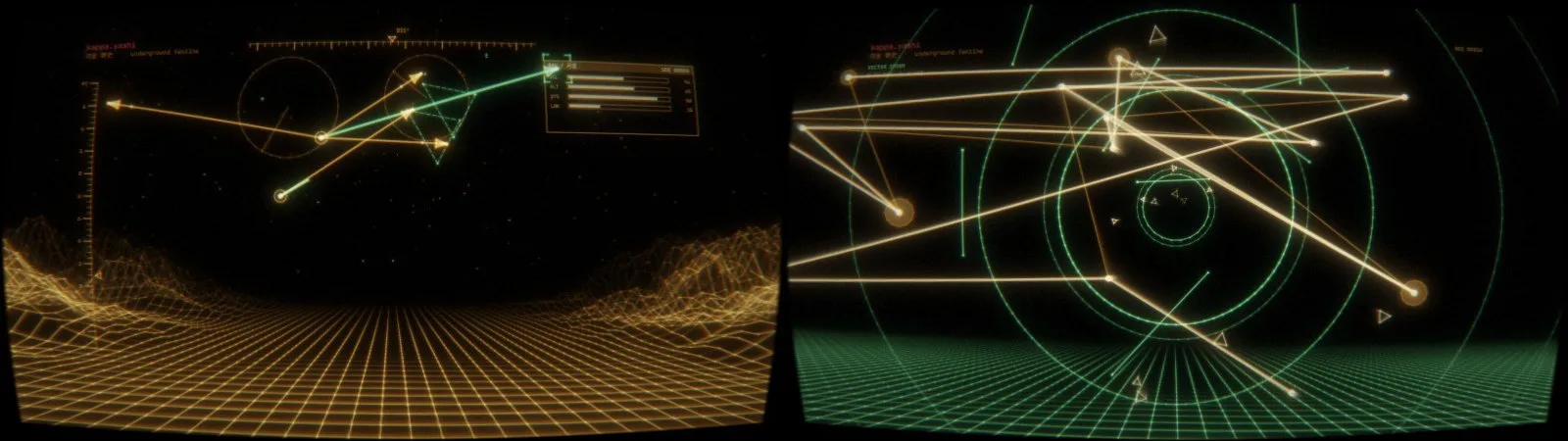
A generative screensaver in the look of the kappa.yashi vector-console clips: amber wireframe terrain, arrows, wire cubes, radar rings, a CRT monitor. It never loops, runs at any resolution, and needs nothing from the internet.
Disclaimer — free software, use at your own risk. This is a free personal project, provided “as is” with no warranty of any kind. kappa.yashi and its author(s) accept no responsibility or liability, to the fullest extent the law allows, for anything that results from downloading, installing or using it (data loss, hardware or driver problems, overheating, power use, screen burn-in …). It is not a security tool and does not lock your computer. It contains flickering and flashing effects — don’t use it if you are sensitive to those, or switch “crt look” off. Full text in English and Greek: DISCLAIMER.md. / Δωρεάν λογισμικό, χρήση με δική σου ευθύνη — δες το DISCLAIMER.md.
index.html— the whole scene (WebGL2, one file, JetBrains Mono embedded). Open it in a browser to preview:Ffullscreen,Mnext scene,Pnext colour set,CCRT on/off,Spacepause.settings.html— the settings window (colours, scenes, frame rate, quality, CRT look) with a live preview.host/— the tiny native app (Rust:tao+wry) that turns the page into a real screensaver. It opens one borderless window per monitor, any key / click / real mouse movement quits, and it stores your settings insettings.jsonnext to the WebView profile (%LOCALAPPDATA%\kappayashi-saveron Windows,~/.local/share/kappayashi-saveron Linux)..github/workflows/build.yml— the GitHub Actions workflow that builds the Windows.scrand the Linux binary on GitHub’s servers.
Download
Ready-made builds are on the Releases page: kappayashi-saver-windows-x64.zip and kappayashi-saver-linux-x86_64.tar.gz. Nothing to compile.
Build it yourself
You don’t need Rust on your PC.
- Fork or copy this repo (it already contains the workflow).
- Make sure Actions are enabled in the repo.
- Open the Actions tab → build → Run workflow (Windows only by default; tick linux to add the Linux build). It takes ~5 minutes. The workflow never runs on its own when you commit, only when you press the button or push a
v*tag. - Open the finished run → Artifacts → download
kappayashi-saver-windows→ it containskappa.yashi.scrandkappayashi-saver.exe.
To publish: Run workflow with the release field filled in (e.g. v0.1.0; a dash like v0.1.0-beta.1 makes it a pre-release), or push a tag like v0.1.0. Either builds both and creates a Release with the Windows and Linux files attached.
Install on Windows
- Right-click
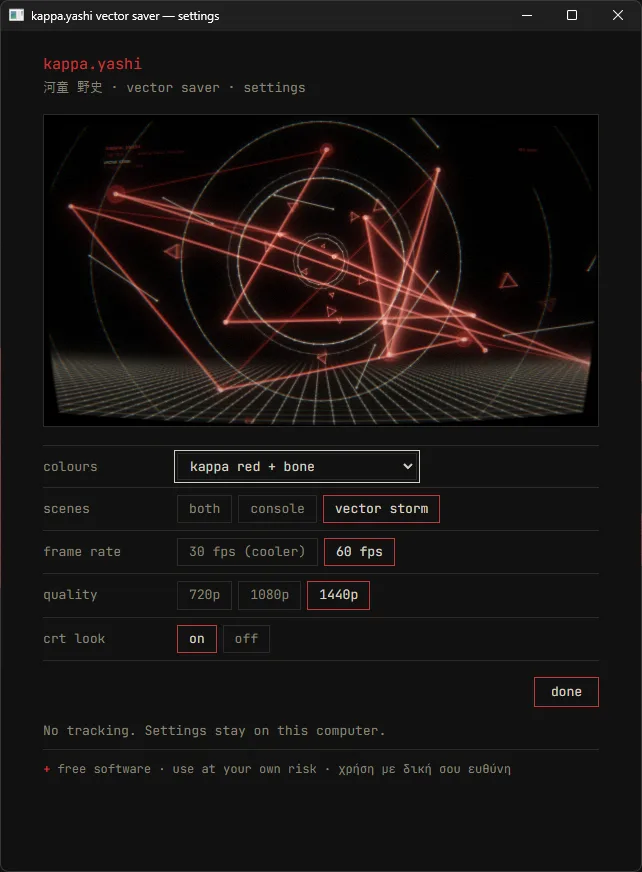
kappa.yashi.scr→ Install. Windows copies it and opens Screen Saver Settings; pick kappa.yashi and set the wait time. - Settings… opens our settings window (below: Windows 11). Preview shows the real thing .
- The file isn’t code-signed, so SmartScreen may warn the first time: More info → Run anyway.
- It needs the WebView2 runtime, which Windows 11 and up-to-date Windows 10 already have.
Linux
Get kappayashi-saver-linux-x86_64.tar.gz from Releases (kappayashi-saver + kappayashi-idle.sh; if the exec bit got lost, chmod +x both). It needs WebKitGTK 4.1 (libwebkit2gtk-4.1-0 on Mint 22 / Ubuntu 24.04, webkit2gtk-4.1 on Arch).
kappayashi-saver --saver              # run it now (one window per monitor)
kappayashi-saver --saver --windowed   # in a normal window, for testing
kappayashi-saver --config             # settings window
Linux has no common screensaver API, so something has to start it when you go idle:
- X11 (Mint / Cinnamon):
kappayashi-idle.sh 5starts it after 5 idle minutes (needsxprintidle). Cinnamon’s own lock screen may kick in first — raise its delay. - Wayland (Hyprland): in
~/.config/hypr/hypridle.conflistener { timeout = 300 on-timeout = /path/to/kappayashi-saver –saver } If your setup already has its own screensaver (Omarchy does), disable that one so they don’t fight.
Status
- Also verified: the page renders both scenes (software GL screenshots); the host builds and runs on Linux under a virtual X server — page loads over the custom protocol, settings save and are picked up by the saver, a key press or real mouse movement quits, a tiny mouse jitter does not.
- Verified on Windows 11: install, settings window, fullscreen saver, exit on input. Not verified yet: Windows 10, real Linux desktops (X11 and Wayland), multi-monitor.
- macOS isn’t covered: a real
.saverwith a WebView is unreliable on recent macOS — see the project notes.
Colours
amber (default) and kappa, plus the dark themes of kappayashi.page: Phosphor Green, Dracula Synth, Monochrome, Nord, Tokyo Night, Tokyo Night Storm, Gruvbox Dark, Electron Dark, Emerald. Pick one in the settings window.
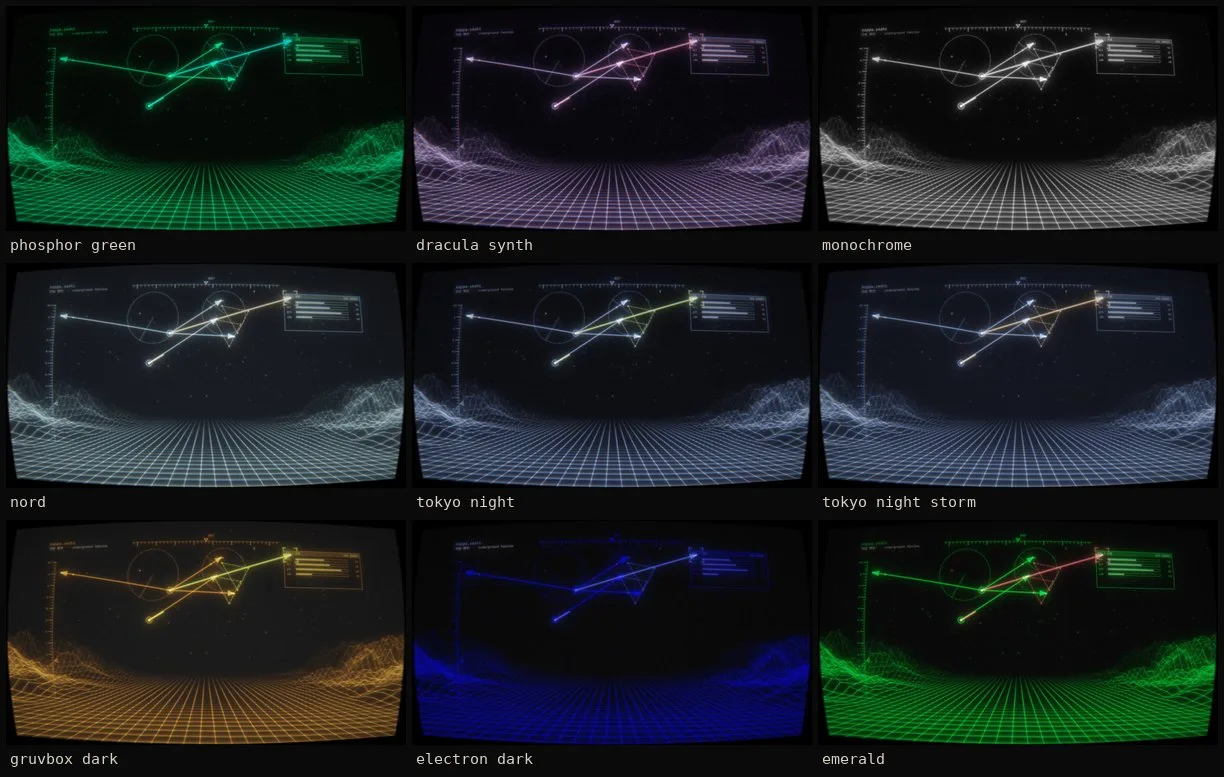
Theme credits: Nord, Tokyo Night and Gruvbox are MIT-licensed colour schemes by their authors; Phosphor Green, Dracula Synth and Monochrome come from the Retro TUI Portfolio template (MIT, © Nivin).
Page options (URL parameters)
?palette=amber|kappa|green|dracula|mono|nord|tokyo-night|tokyo-storm|gruvbox-dark|electron-dark|emerald · ?scene=both|nav|storm · ?fps=30|60 · ?h=720|1080|1440 (internal render height) · ?crt=0 · ?seed=N. They override the saved settings; ?saver=1 and ?embed=1 are used by the host and the settings preview.
Licence
PolyForm Noncommercial 1.0.0. In short (the licence text is what counts):
- Free for any noncommercial use: personal, hobby, study, non-profits, schools.
- You may change it and share it, changed or not, also for free only.
- No commercial use of any kind: no selling it, no bundling it into something paid, no use in paid client work.
- Whoever shares it must pass on the licence and keep the credits — the two
Required Notice:lines at the top of LICENSE.md:kappa.yashi - https://www.kappayashi.page/andhttps://github.com/kappa-yashi/idle-vector_scrnsvr/
For commercial use, ask via https://www.kappayashi.page/.
Third-party parts keep their own licences: the JetBrains Mono font embedded in the pages (SIL OFL 1.1), the Rust crates in the native host (tao, wry and their dependencies, MIT/Apache-2.0), and the Nord, Tokyo Night, Gruvbox and Retro TUI colour schemes (MIT). See also DISCLAIMER.md.
INSTALL
not released yet.
CHANGELOG
v0.2.2 ·
**Windows:** `kappayashi-saver-windows-x64.zip` → unzip to a folder you keep → right-click `kappa.yashi.scr` → Install. Unsigned: SmartScreen → More info → Run anyway. Needs WebView2 (already in Windows 11 / updated Windows 10).
**Linux:** `kappayashi-saver-linux-x86_64.tar.gz` → needs WebKitGTK 4.1 → `./kappayashi-saver --saver` (idle hook: see README).

Licence: PolyForm Noncommercial 1.0.0 — free for noncommercial use, you may change and share it, keep the credits (kappa.yashi - https://www.kappayashi.page/ · https://github.com/kappa-yashi/idle-vector_scrnsvr/). No commercial use.
Free, provided "as is", no warranty, use at your own risk — see [DISCLAIMER.md](https://github.com/kappa-yashi/idle-vector_scrnsvr/blob/main/DISCLAIMER.md). / Δωρεάν, «ως έχει», χρήση με δική σου ευθύνη.
v0.2.1 ·
**Windows:** `kappayashi-saver-windows-x64.zip` → unzip to a folder you keep → right-click `kappa.yashi.scr` → Install. Unsigned: SmartScreen → More info → Run anyway. Needs WebView2 (already in Windows 11 / updated Windows 10).
**Linux:** `kappayashi-saver-linux-x86_64.tar.gz` → needs WebKitGTK 4.1 → `./kappayashi-saver --saver` (idle hook: see README).

Licence: PolyForm Noncommercial 1.0.0 — free for noncommercial use, you may change and share it, keep the credits (kappa.yashi - https://www.kappayashi.page/ · https://github.com/kappa-yashi/idle-vector_scrnsvr/). No commercial use.
Free, provided "as is", no warranty, use at your own risk — see [DISCLAIMER.md](https://github.com/kappa-yashi/idle-vector_scrnsvr/blob/main/DISCLAIMER.md). / Δωρεάν, «ως έχει», χρήση με δική σου ευθύνη.
v0.2.0 ·
**Windows:** `kappayashi-saver-windows-x64.zip` → unzip to a folder you keep → right-click `kappa.yashi.scr` → Install. Unsigned: SmartScreen → More info → Run anyway. Needs WebView2 (already in Windows 11 / updated Windows 10).
**Linux:** `kappayashi-saver-linux-x86_64.tar.gz` → needs WebKitGTK 4.1 → `./kappayashi-saver --saver` (idle hook: see README).

Free, provided "as is", no warranty, use at your own risk — see [DISCLAIMER.md](https://github.com/kappa-yashi/idle-vector_scrnsvr/blob/main/DISCLAIMER.md). / Δωρεάν, «ως έχει», χρήση με δική σου ευθύνη.
v0.1.0 ·
**Windows:** `kappayashi-saver-windows-x64.zip` → unzip to a folder you keep → right-click `kappa.yashi.scr` → Install. Unsigned: SmartScreen → More info → Run anyway. Needs WebView2 (already in Windows 11 / updated Windows 10).
**Linux:** `kappayashi-saver-linux-x86_64.tar.gz` → needs WebKitGTK 4.1 → `./kappayashi-saver --saver` (idle hook: see README).

Free, provided "as is", no warranty, use at your own risk — see [DISCLAIMER.md](https://github.com/kappa-yashi/idle-vector_scrnsvr/blob/main/DISCLAIMER.md). / Δωρεάν, «ως έχει», χρήση με δική σου ευθύνη.
v0.1.0-beta.1 ·
**Windows:** `kappayashi-saver-windows-x64.zip` → unzip to a folder you keep → right-click `kappa.yashi.scr` → Install. Unsigned: SmartScreen → More info → Run anyway. Needs WebView2 (already in Windows 11 / updated Windows 10).
**Linux:** `kappayashi-saver-linux-x86_64.tar.gz` → needs WebKitGTK 4.1 → `./kappayashi-saver --saver` (idle hook: see README).

Free, provided "as is", no warranty, use at your own risk — see [DISCLAIMER.md](https://github.com/kappa-yashi/idle-vector_scrnsvr/blob/main/DISCLAIMER.md). / Δωρεάν, «ως έχει», χρήση με δική σου ευθύνη.
DEVLOG
The Art of the "Useless" Detail: From BBS and the Demoscene to Uncharted Waters of Code
A journey into the joy of digital exploration: BBS, ASCII art, the demoscene, Big Box covers, legendary adventures, cheat codes, and the nights when the world fit into 64 kilobytes.
SEE ALSO
workspace-switcher@kappayashi(applet), wallpapers-2026-11(wallpapers), musiccontrols@kappayashi(applet), wallpapers(wallpapers), sessionManager@kappayashi(applet), separator@kappayashi(applet), kekkai(tool), senrigan(tool)